Clothing · FiveM guide

FiveM Clothing Script for QBCore, Qbox & ESX

Clothing is how players tell their story before they say a word. The clothing script handles every store visit, every saved outfit, every job uniform and, on many servers, the first minutes of a new character in the appearance editor. It also touches money, the database and the inventory, so it has to be reliable as well as good-looking.

This guide covers what to expect from a FiveM clothing script on QBCore, Qbox and ESX, how Rarx Clothing handles each point, where the standalone Services Clothing Pack fits in, and how both are installed.

Buyer's checklist

What a good FiveM clothing script should do

A checklist for comparing clothing resources before you switch.

  1. Stores your staff create in game

    Placing a store should not mean editing coordinates and restarting. Rarx Clothing has a store wizard for the name, type, location, zone, blip, marker and the categories each store sells, with clothes, barber and mask store types.

  2. Prices and stock checked on the server

    Players should never be able to send their own prices. Stock and prices live in the database and are validated on the server at checkout, and stock changes reach every player live.

  3. Outfits that survive the session

    Personal outfits, job outfits managed by bosses by grade, and items a player already owns that can be worn again without paying. Cancelling the menu without saving should restore the original look in full.

  4. Support for streamed clothing

    Most cities add streamed collections and uniforms. Items referenced by collection, component, drawable and texture work without extra mapping, and a number-input mode helps staff who need exact drawable numbers.

  5. A character creator in the same resource

    Face shape, parents, hair, makeup, eyes and an optional height slider in one editor, used for first spawn and barber visits, avoids juggling a second appearance resource.

  6. Compatibility with the scripts you keep

    Other resources often expect a specific appearance resource. Rarx Clothing includes a compatibility layer for scripts that depend on illenium-appearance, enabled with one line in its manifest.

RARX resources

RARX clothing resources

A full clothing system for every framework, and a uniform pack that works with standard clothing menus.

Rarx Clothing — Scripts FiveM resource
New

Scripts

Rarx Clothing

Clothing stores with live stock, outfits, a barber and a full character creator for QBCore, Qbox and ESX.

  • QBCore
  • ESX
  • QBox
€49.99

Rarx Clothing

Rarx Clothing replaces the usual clothing menu with a complete system: stores placed from an admin panel, a photo grid with rendered thumbnails, a cart that buys several items at once with cash or bank, outfits, outfit hangers players can trade through your inventory, and an appearance editor. The framework is detected at startup, so the same files run on Qbox, QBCore and ESX.

Key features

  • Stores built in game. Create clothing, barber and mask stores from an admin panel. No SQL, no restarts.
  • Live stock and pricing. Per-store stock and prices in the database, validated on the server at checkout.
  • Outfits that stay. Personal and job outfits, plus owned items players can re-equip for free.
  • Full character creator. Face shape, parents, hair, makeup, eyes and height in one appearance editor.
Services Clothing Pack — Clothing FiveM resource

Clothing

Services Clothing Pack

Standalone FiveM uniform pack for military, law enforcement, tactical team, EMS and fire department roleplay.

  • STANDALONE
€59.99

Services Clothing Pack

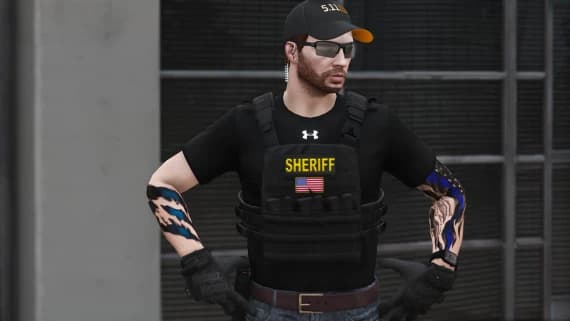
The Services Clothing Pack is a standalone collection of uniforms for military, law enforcement, tactical team, EMS and fire department roleplay. Every item comes in male and female variants with several colour variations, and it works with standard FiveM clothing menus. It has no documentation page on this site.

Key features

  • Five services. Military, law enforcement, tactical team, EMS and fire department uniforms in one pack.
  • Male and female. Every clothing item comes in male and female variants.
  • Colour variations. Several colour variations for each uniform type, plus weather-appropriate options.
  • Standalone. Works with standard FiveM clothing menus, without a specific framework.

Compatibility

Frameworks, dependencies and database

Taken from the product data and, for Rarx Clothing, its documentation.

FeatureRarx ClothingServices Clothing Pack
Resource namerarx_clothing—
FrameworksQbox, QBCore, ESXStandalone
Framework setupDetected automatically at startup in the order qbx_core, qb-core, es_extended.A clothing pack that does not depend on a specific framework.
Required resourcesox_lib, oxmysql, rarx_libNone
Optional resourcesrarx_clothing_screenshot (photo grid thumbnails), ox_target or qb-targetNone
DatabaseImport the included SQL file to create the store, stock and outfit tables.—
LanguagesEnglish, Spanish—
DocumentationOn this site—

Setup

How to install a FiveM clothing script

A summary of the setup for Rarx Clothing. The documentation covers stores, permissions, exports and troubleshooting.

Full documentation
  1. 01

    Download and import the database

    Download rarx_clothing from your Cfx.re Portal and import the included SQL file for stores, stock and outfits.

  2. 02

    Start it after its dependencies

    ox_lib, oxmysql and rarx_lib must start before rarx_clothing. Add rarx_clothing_screenshot if you want the photo grid thumbnails.

  3. 03

    Configure payments and permissions

    Set payment methods, prices, commands and the roles allowed to manage stores in the general config file.

  4. 04

    Create your stores in game

    Run the management command (default /clothing) and use the store wizard. The Services Clothing Pack only needs an ensure line and a restart.

If the photo grid shows blank images, check that rarx_clothing_screenshot is started, or switch to number-input mode in the config. Full documentation: Rarx Clothing

Good to know

Clothing script FAQ

Which frameworks does Rarx Clothing support?
Qbox, QBCore and ESX. The framework is detected automatically at startup in the order qbx_core, qb-core, es_extended.
Can I use streamed or custom clothing?
Yes. Items are referenced by a collection, component, drawable and texture hash, so streamed collections and add-on clothing work without extra mapping.
Can job bosses manage uniforms?
Yes. Enable work attire and set the minimum boss grade per job. Bosses and admins create job outfits that employees with the right grade can wear from outfit stations.
My scripts depend on illenium-appearance. Will they still work?
Rarx Clothing includes an illenium-appearance compatibility layer. Uncomment the provide line in fxmanifest.lua to enable it.
Do players pay again for clothes they already bought?
No. Bought items belong to the character and can be re-equipped from the closet without paying again or returning to the store.
Does the Services Clothing Pack need a framework?
No. It is a standalone pack that works with standard FiveM clothing menus, with male and female variants for every item.

Keep exploring

Dress your city properly

Rarx Clothing runs on Qbox, QBCore and ESX with stores you build in game. Questions about your appearance setup? Ask on Discord.