Pause menu · FiveM guide

FiveM Pause Menu Script for QBCore, Qbox & ESX

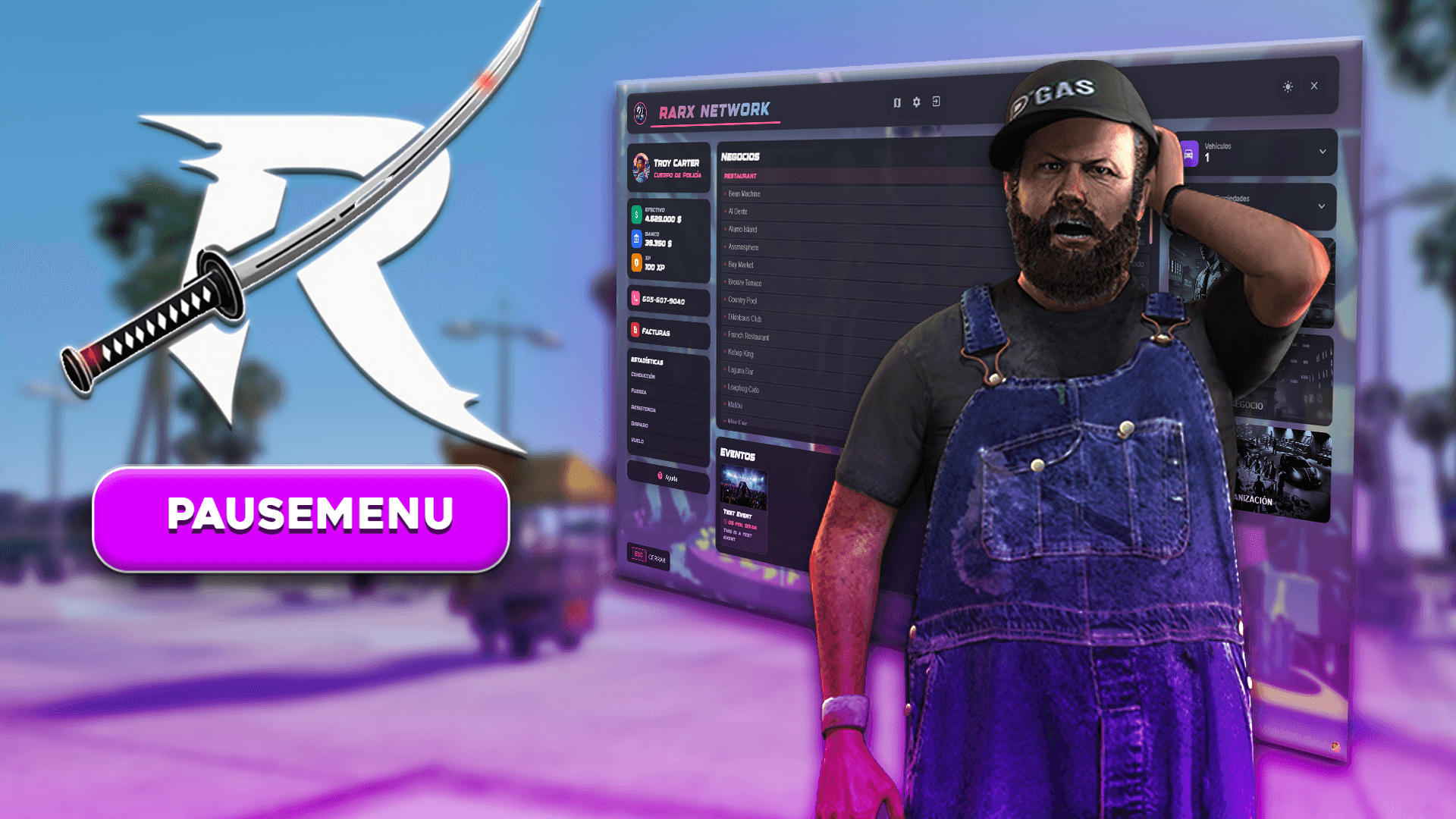
Players press ESC dozens of times per session. The default pause menu shows nothing about your server; a custom one can show who they are, what is happening in the city tonight, what they owe and where to go next, without opening five other menus.

This guide covers what to expect from a FiveM pause menu script on QBCore, Qbox and ESX, how Rarx Pausemenu handles each point, what it needs installed and the questions owners ask before adding it.

Buyer's checklist

What a good FiveM pause menu script should do

A checklist for the menu your players open most.

  1. Character information at a glance

    Name, job, cash, bank and, if you want, the phone number, read from your framework. Rarx Pausemenu also has an XP and level display tied to an account you choose.

  2. What is happening on the server

    Upcoming events with a title, description, date and image, created by staff from an in-game panel and visible to every player instantly. Events stored in the database survive restarts.

  3. Useful shortcuts

    Shortcuts to services, business and organization resources, unlimited custom buttons that run a command or an event, a bills panel to pay pending bills and a key that opens the map directly.

  4. Job-aware content

    Live police and EMS counts in the header, and buttons that can be restricted to specific jobs or shown as locked to everyone else.

  5. Your look, not the default one

    Server name with font selection, logo, background image, primary and secondary colors, dark and light themes and your own hover and click sounds.

  6. Easy to adapt

    Framework behaviour should be overridable without touching the core. Rarx Pausemenu has editable client and server bridge files and open and close events other resources can listen to.

RARX resources

The RARX pause menu script

One resource that replaces the ESC menu on every supported framework.

Rarx Pausemenu — Scripts FiveM resource
Video

Scripts

Rarx Pausemenu

A customizable pause menu with player info, events, bills, app shortcuts and an admin panel for QBCore, Qbox and ESX.

  • QBCore
  • ESX
  • QBox
€19.99

Rarx Pausemenu

Rarx Pausemenu replaces the default ESC menu with an interface built around your server: character info, service status, events, app shortcuts, custom buttons and bills in one place. The three shortcuts auto-detect a compatible services, business or organization resource or can be pinned to a specific one or a custom action.

Key features

  • Player info at a glance. Name, job, cash, bank, phone number and XP level synced with your framework.
  • Server events. Admins create events with title, description, date and image, synced to every player.
  • Your branding. Logo, server name, background image and colours, with dark and light themes.
  • Custom buttons. Unlimited buttons that run commands or events, restricted by job if needed.

Compatibility

Frameworks, dependencies and database

Taken from the product data and its documentation.

FeatureRarx Pausemenu
Resource namerarx_pausemenu
FrameworksESX, QBCore, Qbox
Framework setupDetected automatically at startup.
Required resourcesox_lib, oxmysql, rarx_lib
Optional resourcesrarx_services or origen_police (services shortcut), rarx_jobs or origen_masterjob (business shortcut), rarx_ilegal, origen_ilegal or rarx_gangs (organization shortcut)
DatabaseImport the included SQL file to create the events table.
LanguagesEnglish, Spanish
DocumentationOn this site

Planning

Making the pause menu work for your community

Treat the menu as your server's front page. Events are the part players read most: create them a few days ahead with an image and a clear date, and remove them once they are over, because the number of active events is capped by a configurable limit. Custom buttons are the best place for links players otherwise ask staff about, such as rules, a help command or your support channel.

Keep the shortcuts honest. If you do not run a services, business or organization resource, pin those shortcuts to a custom action or leave them out instead of showing buttons that do nothing. Job restrictions on custom buttons let you show staff or department tools only to the people who can use them.

Setup

How to install a FiveM pause menu script

A summary of the setup. The documentation covers branding, buttons, apps and the admin panel.

Full documentation
  1. 01

    Download and import the database

    Download rarx_pausemenu from your Cfx.re Portal and import the included SQL file for the events table.

  2. 02

    Start it after its dependencies

    ox_lib, oxmysql and rarx_lib must start before rarx_pausemenu.

  3. 03

    Configure

    Set branding, colours, buttons, apps, service status jobs and admin identifiers in the shared config.

  4. 04

    Create your first event

    Open the admin panel with its keybind (END by default) and add an event with title, description, date and image.

Colours must be HEX values without the # prefix. Job names in the service status must match your framework exactly. Full documentation: Rarx Pausemenu

Good to know

Pause menu script FAQ

Which frameworks does Rarx Pausemenu support?
ESX, QBCore and Qbox. The framework is detected automatically.
What do I need installed?
ox_lib, oxmysql and rarx_lib, started before the pause menu, plus the included SQL file for the events table.
Who can manage events?
Players whose identifiers are listed in the admin section of the config. The number of active events is capped by a configurable limit.
Can I add my own buttons?
Yes, as many as you need. Each button has an image and triggers a command, a client event or a server event, and can be limited to specific jobs.
Why is the XP value not showing?
Enable the XP option and make sure the account name in the config matches the exact account name in your framework.
Does it support light and dark themes?
Yes. Players can switch between dark and light themes in game, using the colours you defined.

Keep exploring

Turn ESC into your server's front page

Rarx Pausemenu runs on ESX, QBCore and Qbox with your logo and colours. Questions? Ask us on Discord.