HUD · FiveM guide

FiveM HUD Script for QBCore, Qbox & ESX

The HUD is on screen for every second a player spends on your server. It has to show health, needs, money and vehicle data at a glance, stay out of the way during scenes and look like it belongs to your city rather than to a template.

This guide lists what to expect from a FiveM HUD script on QBCore, Qbox and ESX, how Rarx HUD handles each point, what it needs installed and the questions server owners ask before replacing their HUD.

Buyer's checklist

What a good FiveM HUD script should do

Use these points to compare HUD resources, including ours.

  1. Status and vehicle data in one resource

    Health, armor, hunger, thirst, stamina, oxygen and stress on foot; speed, RPM, gear, fuel, seatbelt, cruise control and turn signals in a vehicle. One resource avoids two HUDs overlapping or reading the same values twice.

  2. Hide what is not needed

    A good HUD shows less, not more. Rarx HUD hides the armor bar when it is empty, shows the oxygen meter only underwater and can show cash and bank only when the balance changes or on command.

  3. Players choose their own layout

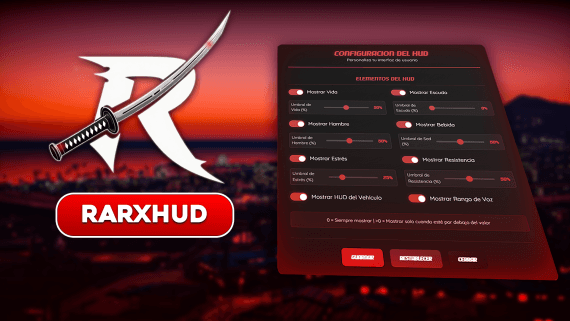
    Server defaults should be a starting point. Rarx HUD has an in-game settings menu for colors, layout, visibility, icon and text size and speed units, plus an edit mode where players drag every element to a new position.

  4. It reads the systems you already run

    Fuel should come from your fuel resource and the talking indicator from your voice resource. Rarx HUD reads fuel from the resource set in its config and supports pma-voice for the microphone and voice range indicator.

  5. Notifications that match the HUD

    Notifications, DrawText and key hints should share the same look. Rarx HUD includes a complete notification system and answers under the rarx_notify name, so existing calls keep working without another resource.

  6. Room for roleplay and recording

    A stress system with screen effects gives fast driving and shooting a consequence, and a cinematic mode with letterbox bars hides the HUD for scenes and videos.

RARX resources

The RARX HUD script

One resource for player status, the vehicle dashboard and notifications.

Rarx HUD — Scripts FiveM resource
Video

Scripts

Rarx HUD

Player status, vehicle dashboard, stress and built-in notifications with in-game settings for QBCore, Qbox and ESX.

  • STANDALONE
€19.99

Rarx HUD

Rarx HUD puts player status, the vehicle dashboard, weapon info, a heading compass with street and postal labels, money and world info in one resource, with notifications built in. Every value in its config is the default a player gets on first join; players then adjust most of it from the settings menu within the limits you allow. Adapters for snt and vRP are included besides the three frameworks below.

Key features

  • Status and vehicle in one. Health, armor, hunger, thirst, stress, stamina and oxygen next to speed, RPM, fuel and gears.
  • Players set their own HUD. An in-game menu for colors, layout, visibility and units, plus a drag-and-drop move mode.
  • Notifications included. Notifications, DrawText, 3D key hints and a help bar without a separate notify resource.
  • Stress and cinematic mode. Stress from speeding and shooting with screen effects, and letterbox bars for scenes.

Compatibility

Frameworks, dependencies and integrations

Taken from the product data and its documentation.

FeatureRarx HUD
Resource namerarx_hud
FrameworksQBCore, Qbox, ESX
Framework setupDetected automatically. Adapters for snt and vRP are also included.
Required resourcesox_lib, rarx_lib
Optional resourcesA fuel resource set in Config.FuelResource (default LegacyFuel)
LanguagesEnglish, Spanish
DocumentationOn this site

Planning

Planning your server's HUD

Set the defaults for a new player, not for staff. Every value in the config is what a player sees on first join, and most players never open the settings menu, so the default layout should be clear on a small screen. Players who care can then move elements, change colors and units, and their settings persist across sessions.

Check which systems the HUD should read. Point the fuel setting to the fuel resource you run, keep the stress system only if your city wants that consequence, and route framework and ox_lib notifications through the HUD so every message looks the same.

Setup

How to install a FiveM HUD script

A summary of the setup. The documentation covers every config option, exports and notification integration.

Full documentation
  1. 01

    Download from the Cfx.re Portal

    Download the resource linked to your Cfx.re account and extract rarx_hud into your resources folder.

  2. 02

    Start it after its dependencies

    Ensure rarx_hud after ox_lib, rarx_lib and your framework. The framework is detected automatically.

  3. 03

    Set the defaults

    Edit the shared config for default colors, layout, visibility, the fuel resource, the stress system and notification options.

  4. 04

    Route notifications (optional)

    Point your framework or ox_lib notify function to the HUD's notify export so every notification uses the same style. Stop any standalone rarx_notify resource.

If color or config changes do not apply, fully stop and start the resource and reconnect to clear the interface cache. Full documentation: Rarx HUD

Good to know

HUD script FAQ

Which frameworks does Rarx HUD support?
QBCore, Qbox and ESX, detected automatically. Adapters for snt and vRP are included as well.
Can each player customize the HUD?
Yes. The settings menu (default key I, or /hud_settings) changes colors, layout, visibility, sizes and speed units, and an edit mode lets players drag each element. Settings persist across sessions.
Does it work with my fuel script?
Fuel is read from the resource set in Config.FuelResource, LegacyFuel by default, so you can point it to the fuel system your server runs.
Do I still need a separate notification resource?
No. Notifications, DrawText, 3D key hints and a help bar are included, and the HUD answers under the rarx_notify name.
Can I turn the stress system off?
Yes. Stress can be disabled entirely. When enabled, speed thresholds, whitelisted weapons and relief interval are configurable, and police can be excluded on QBCore and Qbox.
Which languages are included?
English and Spanish, chosen with the rarx-lang convar. New languages can be added by copying the English translation file.

Keep exploring

A HUD that fits your server

Rarx HUD runs on QBCore, Qbox and ESX with in-game settings for every player. Ask us about your setup on Discord.